
Connecting
Session URLs
Write a connection as one URL, generate it from a site, and know what linscp ignores in URLs from untrusted sources.
A session URL packs a whole connection into one string. You can type it into
the Site Manager’s Host name box, paste it with Paste Session URL
(Ctrl+V in the tree), open it with
Tabs › Sites › Open URL…, pass it to linscp or linscp-cli on the
command line, or click it in a browser once linscp handles those links.
Syntax
Section titled “Syntax”scheme://[user[:password][;fingerprint=key][;x-name=value]@]host[:port][/path/]- scheme selects the protocol:
sftp,scp,ftp,ftps(implicit TLS),ftpes(explicit TLS),dav,davs,s3, orssh(opens SFTP).httpandhttpsmean WebDAV, except for known S3 endpoints. - user and password are optional. Percent-encode reserved
characters:
@becomes%40,:becomes%3A,;becomes%3B. - fingerprint pins the server’s expected host key or TLS certificate fingerprint, so no prompt appears. See Verifying host keys.
- x-name=value sets any site setting by its raw name, as in raw settings.
- host can be a name or an address. Put IPv6 addresses in brackets:
[2001:db8::10]. - path is the remote directory to open. End it with
/; without the slash the last part is treated as a file to download.
Examples:
sftp://alice@files.example.org/var/www/ftpes://deploy@example.com:2121/s3://AKIAEXAMPLE@s3.amazonaws.com/my-bucket/sftp://alice;fingerprint=ssh-ed25519-255-AbCdEf0123@192.0.2.10/Avoid putting passwords in URLs. They end up in shell history, process lists and logs.
Generate a URL from a site
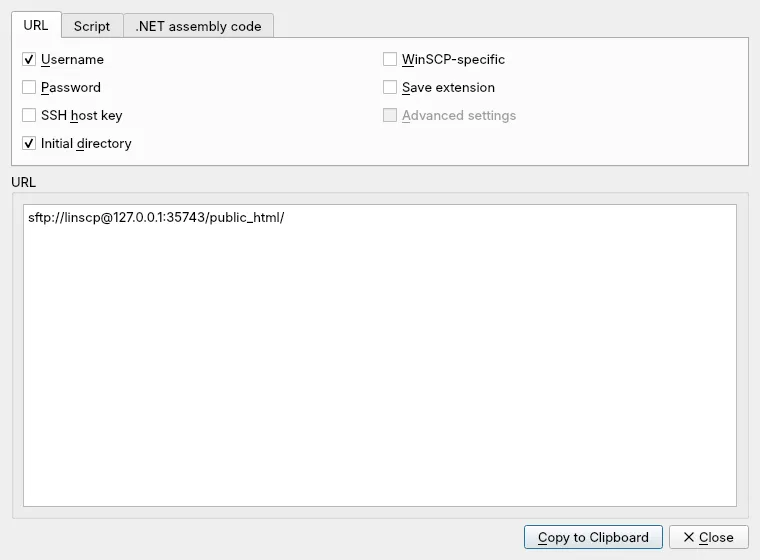
Section titled “Generate a URL from a site”Use Commands › Generate Session URL/Code… for the current session, or
Generate Session URL/Code… from the Site Manager’s Manage menu for a
saved site. The URL tab builds the address; check what it should carry:
Username, Password, SSH host key, Initial directory, and
Advanced settings for settings that differ from the defaults. The other
tabs give the same connection as a script for linscp-cli or as code for the
.NET assembly. Copy to Clipboard takes the result.
Opening links from a browser
Section titled “Opening links from a browser”The linscp desktop entry registers it for sftp:, scp:, ftp:, ftps:,
ftpes:, dav:, davs:, s3: and ssh: links, plus the winscp- forms of
these schemes. A link opened that way starts linscp with /Unsafe, which
marks the URL as coming from an untrusted source.
What linscp ignores in untrusted URLs
Section titled “What linscp ignores in untrusted URLs”A web page can hand you any link, so linscp drops the settings that could make your computer run something. From an untrusted URL it ignores:
- the remote Shell, Listing command and SFTP server;
- the local proxy command and the Telnet proxy command;
- the remote recycle bin settings, FTP Post login commands and the Return code variable;
- permission for WebDAV redirects to other hosts or to plain HTTP.
The same run also refuses switches that would change your configuration, and
linscp-cli runs no script commands.
When you paste or type a URL whose x- settings include any of these, linscp
asks before using them. Answer Cancel unless you trust where the URL came
from.